Attack Scenario: Certificate Validation Bypass
TLS is only as strong as the certificate validation that backs it up. Encrypting traffic means nothing if the client accepts a forged or malformed certificate, any attacker who can get a certificate in front of the EVCC owns the session. In this scenario, we probe exactly where the Josev EVCC draws the line: which certificate defects does it catch, and which ones does it silently wave through?
We run three sub-scenarios, each presenting the EVCC with a different class of certificate, and we record what happens at the TLS handshake in each case.
Standard requirement (ISO 15118-2, §8.7.4): When TLS is used the EVCC shall validate the SECC’s certificate against a trusted V2G root CA and shall abort the session if validation fails. The specification does not mandate hostname verification, but the certificate must chain to a trusted root and must not be expired.

Generate the test certificates
To run this test, we first need to generate three sets of certificates. We will test the following three scenarios:
| # | Sub-scenario | SECC certificate defect | Expected outcome |
|---|---|---|---|
| A | valid | None (signed by trusted research-lab CA) | TLS succeeds, session proceeds |
| B | self_signed | Self-signed, no chain to any CA | TLS rejected |
| C | expired | notAfter=Jan 2 00:00:00 2020 GMT | TLS rejected |
To simplify our certificates generation, we are going to use the script make-certs.sh. It creates a self-signed research-lab Root CA, then uses it to issue three SECC certificate variants; one valid, one expired (backdated to January 2020), and one self-signed (no CA chain at all). It also creates an EVCC trust store containing only that Root CA, so the EVCC has a fixed reference to validate against across all sub-scenarios. All output is placed under certs/ in the directory layout. If you have not run this yet, do it now:
bash make-certs.sh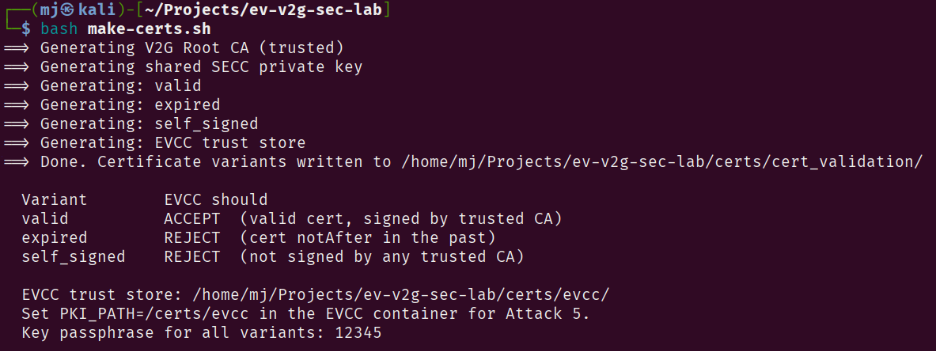
Once completed, we have a ca/ folder containing the Root CA, ./certs/cert_validation/ populated with one subfolder per sub-scenario (valid/, self_signed/, expired/), and an evcc/ folder that represents the EVCC trust store, only our research-lab Root CA is stored there, so the EVCC always validates against the same Root CA regardless of which sub-scenario is active.
Running a sub-scenario
Each sub-scenario is selected by exporting two host-side environment variables before calling docker compose up. - SECC_SCENARIO is forwarded to both containers by Compose: the SECC’s entrypoint uses it to load the matching .env config file. - EVCC_PKI_PATH is forwarded to the EVCC container as PKI_PATH, pointing Josev to the research-lab Root CA trust store.
SECC_ENFORCE_TLS=True is set in all three SECC configs, so TLS is always offered. What changes between sub-scenarios is the certificate material the SECC presents.
In addition, for all the sub-scenarios we use the same fixed IPv6 addresses for the SECC and EVCC, so that the Wireshark captures are easier to read. The addresses are derived from the MAC addresses of the two containers, which are also fixed in docker-compose.yml:
Fixed addresses (valid for all sub-scenarios):
SECC → fe80::ff:fe00:1 (MAC 02:00:00:00:00:01)
EVCC → fe80::ff:fe00:2 (MAC 02:00:00:00:00:02)
Collect captures and logs
As usual, the pcaps are automatically captured and saved into ./captures/cert_validation_<name>/ after each run. To focus on the TLS handshake frames in Wireshark:
tls || udp.port == 15118Let’s start with the positive baseline: a valid certificate that chains to our trusted research-lab CA.
Sub-scenario A: Valid Certificate (Positive Baseline)
Before testing the attack cases, we first confirm that our lab works correctly with a valid certificate. This is our baseline: if the EVCC rejects a good certificate, we have a configuration problem, not a security finding.
The SECC configuration for this sub-scenario is in secc/config/cert_validation/valid.env.
PROTOCOLS=ISO_15118_2
AUTH_MODES=EIM
SECC_ENFORCE_TLS=True
FREE_CHARGING_SERVICE=False
LOG_LEVEL=DEBUG
PKI_PATH=/certs/cert_validation/valid/
The SECC will load a certificate signed by our research-lab CA, and the EVCC trust store points to that same CA. The handshake should succeed and the session should proceed.
Before running the test, we can inspect the certificate using the openssl command:
openssl x509 -noout -subject -issuer -dates \
 -in certs/cert_validation/valid/iso15118_2/certs/cpoCertChain.pem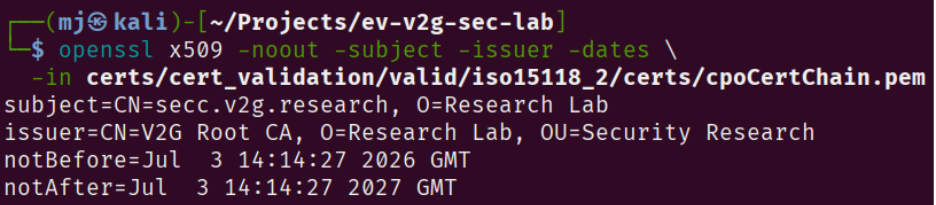
Let’s pass the valid certificate scenario as an environment variable to the SECC container and the trust store path to the EVCC container, then run the lab:
# Cleanup: stop and remove any containers and volumes from a previous run
docker compose down -v
docker rm -f attacker 2>/dev/null || true

export SECC_SCENARIO=cert_validation_valid
export EVCC_PKI_PATH=/certs/evcc
docker compose up secc evcc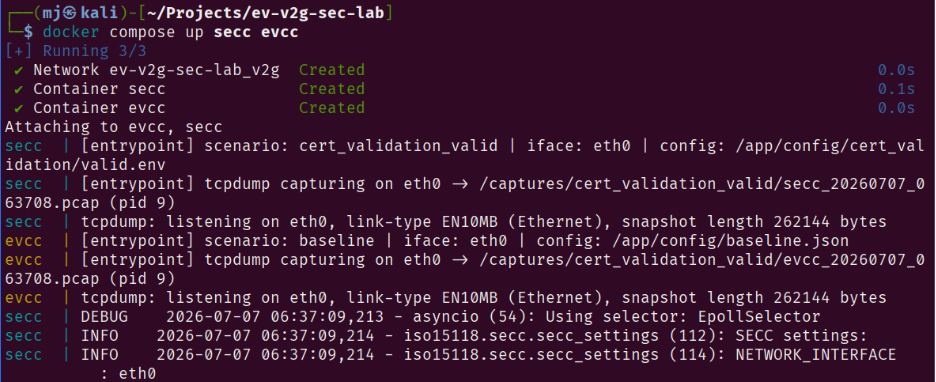
Traffic Analysis
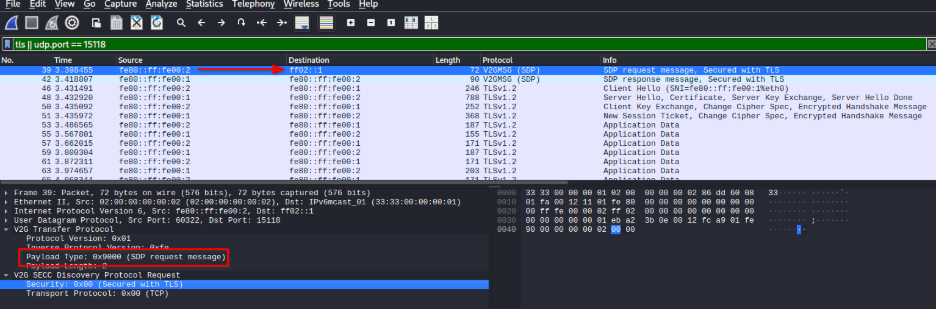
We can find the pcap in ./captures/cert_validation_valid/. Let’s open it in Wireshark and analyze what happens.
SDP Request
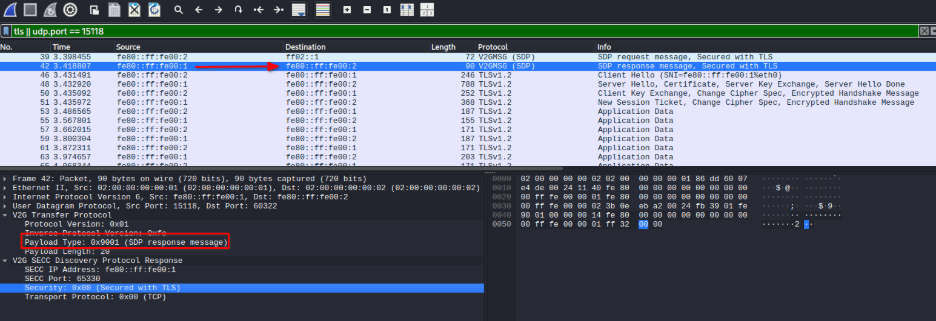
From article 4 we are familiar with the SDP request/response and TCP handshake, so first the EVCC sends an SDP request with secured TLS enabled.
SDP Response
The SECC responds with its IP address, port, and Security: 0x00, confirming TLS will be used. Both sides are aligned:
TCP Three-Way Handshake
With the SECC’s IP address and port in hand, the EVCC opens a TCP connection. The standard three-way handshake completes without issue; at this point neither side has exchanged any credentials, the channel is not yet encrypted, and the EVCC has committed to nothing beyond opening a socket:
EVCC → SECC: SYN
SECC → EVCC: SYN-ACK
EVCC → SECC: ACK
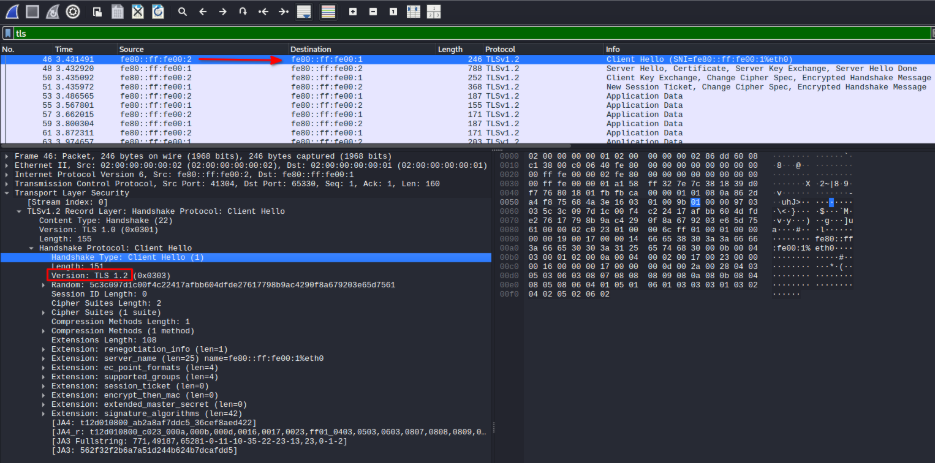
TLS ClientHello
Within a millisecond of the TCP handshake completing, the EVCC sends its TLS ClientHello, which is the behaviour we want to see:
TLS ServerHello + Certificate + ServerKeyExchange + ServerHelloDone
The SECC presents its certificate. We can check the Certificate frame in Wireshark for more details:
TLSv1.2 Server Hello, Certificate, Server Key Exchange, Server Hello Done
 Selected cipher: TLS_ECDHE_RSA_WITH_AES_128_CBC_SHA256
 Certificate: CN=secc.v2g.research (signed by V2G Root CA)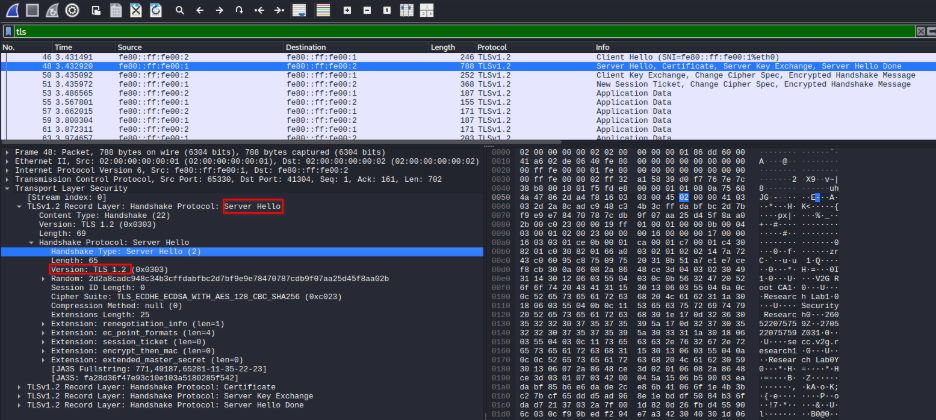
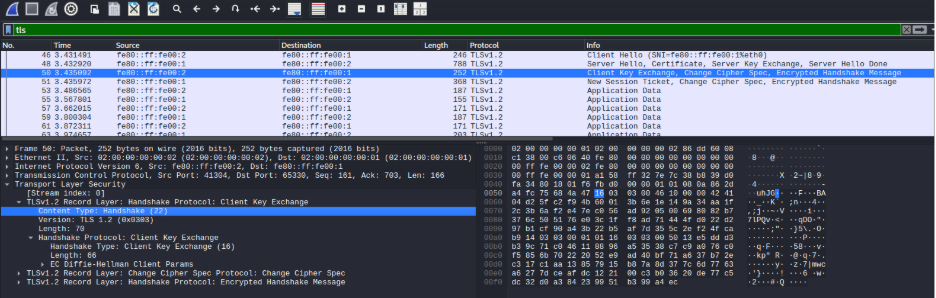
TLS ClientKeyExchange + ChangeCipherSpec + Finished
The EVCC validated the certificate chain and sent its key material. The handshake is accepted and the session is established. All subsequent V2G application messages travel inside encrypted TLSv1.2 Application Data records.
We can also check the EVCC log to confirm successful session:
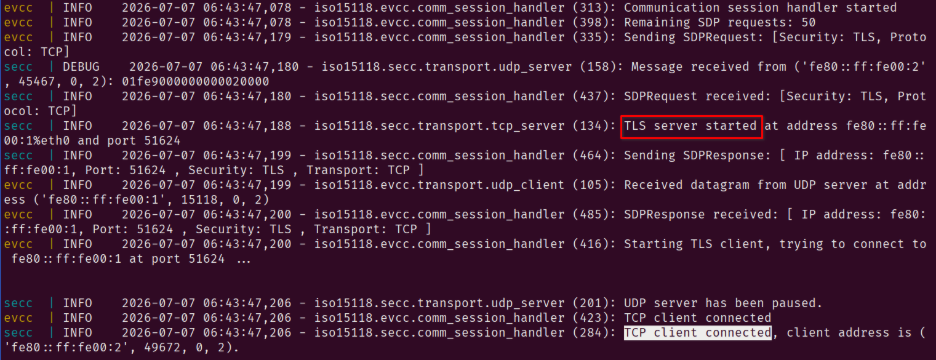
Baseline confirmed: the EVCC correctly accepts a well-formed certificate from a trusted CA.
Sub-scenario B: Self-Signed Certificate
Now we move to the next sub-scenario. What happens when the SECC presents a certificate it signed itself, with no chain to any CA?
To do the test, we set SECC_SCENARIO=cert_validation_self_signed so the SECC loads the self-signed certificate config from secc/config/cert_validation/self_signed.env:
PROTOCOLS=ISO_15118_2
AUTH_MODES=EIM
SECC_ENFORCE_TLS=True
PKI_PATH=./certs/cert_validation/self_signed/
No change to the EVCC container, the trust store remains EVCC_PKI_PATH=/certs/evcc so the EVCC has the research-lab CA to validate against.
The SECC will load a certificate it signed with its own key; there is no CA in the chain at all. Again, we can inspect the certificate before running:
openssl x509 -noout -subject -issuer -dates \
 -in certs/cert_validation/self_signed/iso15118_2/certs/cpoCertChain.pem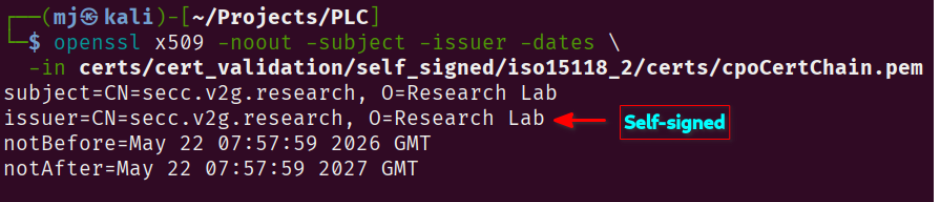
Notice that subject and issuer are identical, meaning the certificate was signed by itself rather than by any CA.
We are ready; let’s bring up the containers.
export SECC_SCENARIO=cert_validation_self_signed
export EVCC_PKI_PATH=/certs/evcc
docker compose up secc evcc --abort-on-container-exit
The TLS handshake never completes. Looking at the EVCC log, we can see the rejection happens immediately after the SECC presents its certificate.
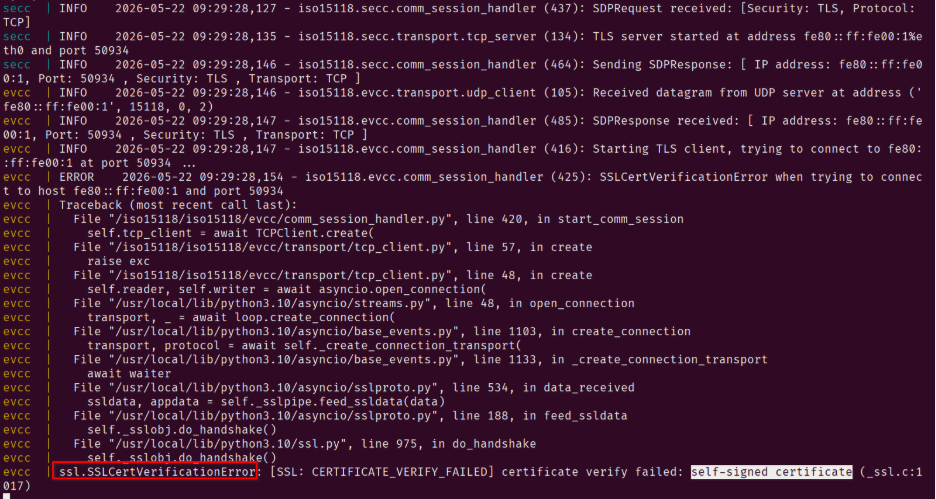
In the pcap, we can see that after the TCP handshake, the SECC sends its ServerHello and certificate, but the EVCC does not respond with a ClientKeyExchange, rather, it sends an ACK then FIN/ACK to close the connection:
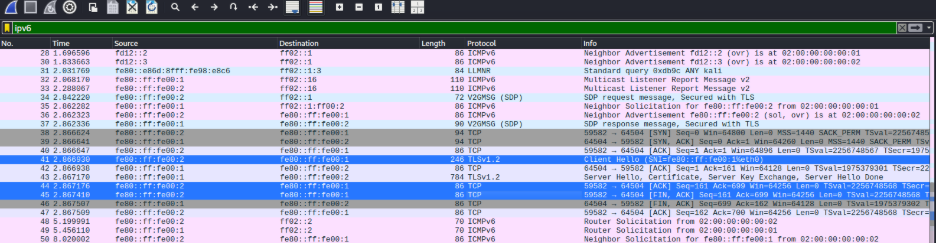
This confirms that no ISO 15118-2 application data is exchanged.
Sub-scenario C: Expired Certificate
Next: a certificate that was once legitimately issued by our trusted CA, but whose validity window closed six years ago. This tests whether the EVCC checks the notAfter field.
The SECC configuration for this sub-scenario is in secc/config/cert_validation/expired.env:
PROTOCOLS=ISO_15118_2
AUTH_MODES=EIM
SECC_ENFORCE_TLS=True
PKI_PATH=./certs/cert_validation/expired/
Inspect the certificate before running:
openssl x509 -noout -subject -issuer -dates \
 -in certs/cert_validation/expired/iso15118_2/certs/cpoCertChain.pem
Unlike the self-signed case, the issuer here is our research-lab CA; the chain is cryptographically valid. The only problem is the validity window: notAfter is January 2 2020, placing the certificate more than six years in the past.
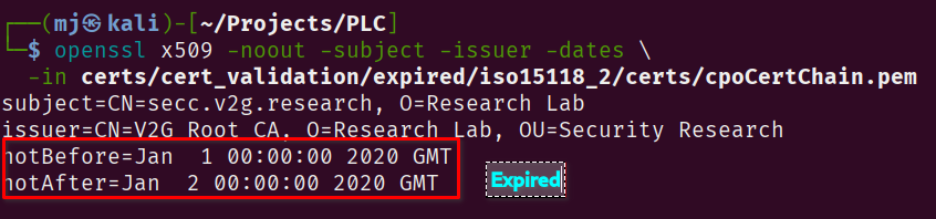
Set SECC_SCENARIO=cert_validation_expired so the SECC loads the expired certificate config, and EVCC_PKI_PATH=/certs/evcc so the EVCC has the research-lab CA to validate against. Then bring both containers up:
export SECC_SCENARIO=cert_validation_expired
export EVCC_PKI_PATH=/certs/evcc
docker compose up secc evcc --abort-on-container-exit
This scenario is subtler than the self-signed case. The certificate has a legitimate signature from our trusted CA, so the chain validation step passes. The EVCC has to go one step further and check the validity window, and that is where the handshake falls apart. The notAfter field puts the certificate six years in the past, and the EVCC refuses to proceed.
The chain is valid (the certificate really was signed by our trusted CA), but the EVCC catches the expired timestamp:
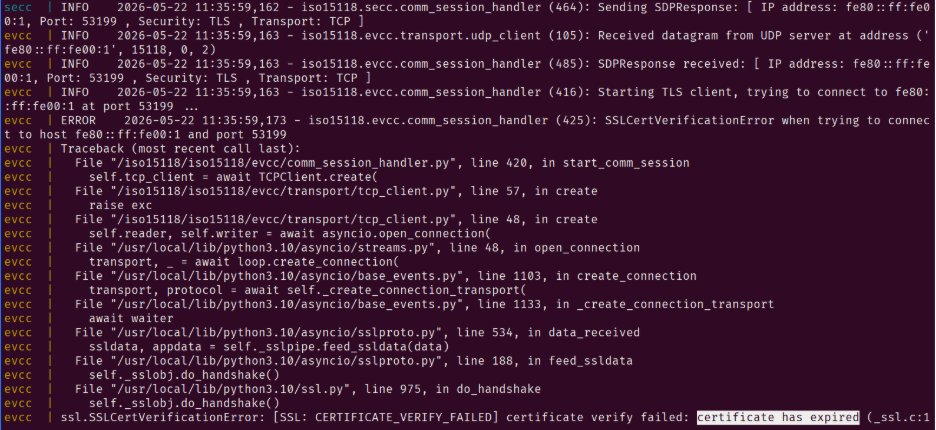
The network-level behaviour mirrors Sub-scenario B exactly. After the SECC delivers its ServerHello and the expired certificate, the EVCC sends an ACK to acknowledge receipt, then immediately fires a FIN/ACK to tear the connection down: no ClientKeyExchange, no application data, no session.
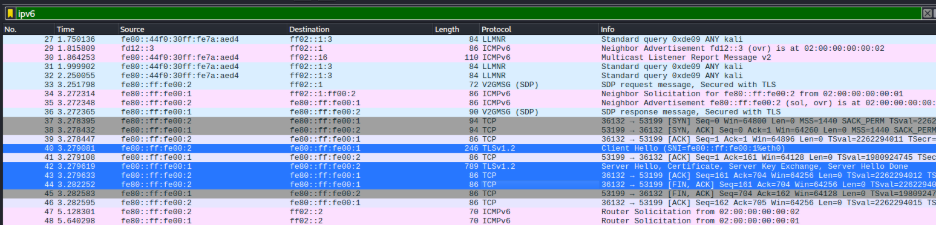
By the end of this sub-scenario, we have confirmed that the EVCC correctly rejects both self-signed and expired certificates, while accepting a valid certificate from a trusted CA. This demonstrates that the Josev EVCC implements proper certificate validation as required by ISO 15118-2, §8.7.4. That wraps up this article; see you in the next one where we will explore the protocol namespace downgrade attack.