Lab Environment — Docker Setup (V2G security research)
This post is part of an ongoing series on V2G security research.
Before diving into the lab setup, here is the full series — so you know where we are and what is coming next.
In Part 1 we covered the full V2G protocol stack — from the SLAC physical-layer pairing all the way up to ISO 15118-2 application messages — and mapped the attack surface at each layer.
Before we can run any of those attacks, we need a lab.
This article walks through the Docker-based environment we built to simulate a complete V2G exchange entirely in software, with no hardware required.
Project Layout
The repository contains several directories; the ones relevant to the lab are:
ev-v2g-sec-lab/
├── docker-compose.yml # Main compose file: secc, evcc, attacker services
├── docker-compose.hardware.yml # Track B override for real hardware / host networking
├── make-certs.sh # Generates all certificate material under certs/
├── secc/
│ ├── Dockerfile
│ ├── entrypoint.sh
│ └── config/ # SECC scenario .env files (one per attack)
│ ├── baseline.env
│ ├── attack2_no_tls.env
│ ├── attack3_din_only.env
│ └── cert_validation/ # Per-variant cert validation scenarios
├── evcc/
│ ├── Dockerfile
│ ├── entrypoint.sh
│ └── config/
│ └── baseline.json # Fixed EVCC config — never changed between scenarios
├── attacker/
│ ├── Dockerfile
│ └── scripts/ # Scapy-based attack scripts
│ ├── attack1_sdp_spoof.py
│ ├── attack4_icmpv6_mitm.py
│ └── attack_replay.py
├── certs/ # Certificate material generated by make-certs.sh
│ ├── evcc/
│ └── cert_validation/ # Per-scenario certs (expired, self_signed, etc.)
└── captures/ # pcap files written by tcpdump inside containers
Our goal is to assess the vehicle side of the V2G stack. In every attack scenario, the EVCC is the target and we are testing whether it correctly enforces the security requirements defined in ISO 15118-2. To do that, we built a software lab using Docker to simulate a complete V2G exchange across three containers on a shared IPv6-only bridge network. One container runs the SECC (charging station), another runs the EVCC (electric vehicle), and a third optional container acts as the attacker. The diagram below shows the topology: all three containers share a single IPv6 bridge, traffic between them is captured by tcpdump running inside each container, and the attacker container is only activated for attack scenarios via a Docker Compose profile.
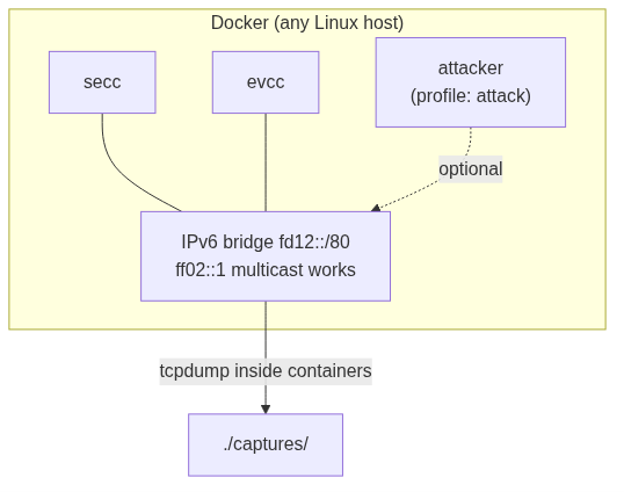

| Container | Role | Image |
| secc | Charging station (SECC) | Josev iso15118 Python stack |
| evcc | Electric vehicle (EVCC) | Josev iso15118 Python stack |
| attacker | Attack scripts (Scapy) | python:3.10-slim + scapy |
For the ISO 15118-2 stack we use the open-source Josev project — a Python implementation of the standard maintained by SwitchEV that provides both SECC and EVCC. It is a widely referenced implementation and representative enough of real production code to make it a meaningful test target.
Setting up the SECC Container
The SECC container runs iso15118.secc.main from the Josev project. It listens on UDP port 15118 for SDP multicast requests and responds with its IPv6 address and a dynamically chosen TCP port, then handles the full ISO 15118-2 message sequence from SDP all the way to session stop.
Since we control the SECC in our lab — representing either a rogue station or a misconfigured legitimate one — its behaviour is driven by environment-variable configuration files. There are several scenario files under secc/config/, one per attack covered in this series. Switching scenarios is as simple as setting the SECC_SCENARIO environment variable to the scenario name before running docker compose up; the entrypoint picks the matching .env file and loads it, allowing us to toggle TLS enforcement, supported protocols, certificate material, and other parameters without rebuilding the image.
The SECC Dockerfile: - Installs Python, Java (required for EXI encoding/decoding), and tcpdump for traffic capture - Clones and installs the Josev iso15118 repository - Copies configuration files and the entrypoint script into the container - Runs tcpdump on the shared interface and writes captures to a host-mounted volume for offline analysis with Wireshark
Setting up the EVCC Container
The EVCC container runs iso15118.evcc.main and models an EV under test. It starts 2 seconds after the SECC to ensure the SDP listener is ready, then multicasts its SDP request, connects to whatever TCP endpoint the SDP response advertises, and drives the full ISO 15118-2 handshake to completion.
The EVCC configuration is deliberately fixed across all attack scenarios — a single JSON file that we never modify. This constraint is intentional: the EVCC is always the victim, and we never adjust its settings to make an attack succeed. If an attack works, it is because the EVCC’s own behaviour is non-conformant with the standard. The container exits automatically once the session completes (SessionStop → TCP close), and traffic is captured to the shared volume in the same way as the SECC.
Setting up the Attacker Container
The attacker container hosts our custom Scapy-based attack scripts. It is joined to the same IPv6 bridge network as the SECC and EVCC and is granted NET_ADMIN and NET_RAW capabilities so that it can craft and inject raw packets at Layer 2 and above. The attacker container is kept behind a Docker Compose profile so it is only activated when running a specific attack scenario, preventing any unintended interference with baseline captures.
SECC Scenarios
Each attack scenario is controlled by a .env file passed to the SECC container. The file sets environment variables that Josev reads at startup to configure its behaviour — no image rebuild is needed to switch scenarios.
| Scenario | Purpose |
| baseline | Normal session; reference capture |
| attack2_no_tls | No TLS certs available; SDP response advertises cleartext — tests whether EVCC accepts it |
| attack3_din_only | SECC only offers DIN SPEC 70121 — tests whether EVCC downgrades from ISO 15118-2 |
| cert_validation_valid | SECC presents a valid cert signed by the research-lab CA — positive baseline, EVCC should accept |
| cert_validation_self_signed | SECC presents a self-signed cert not chained to any CA — EVCC should reject |
| cert_validation_expired | SECC presents an expired certificate — EVCC should reject the TLS handshake |
Running the lab
Prerequisites:
# Enable IPv6 in Docker daemon (one-time, requires restart)
sudo tee /etc/docker/daemon.json <<'EOF'
{ "ipv6": true, "fixed-cidr-v6": "fd00::/80" }
EOF
sudo systemctl restart docker
# Generate all certificate material
bash make-certs.sh
All commands below must be run from the repository root (~/Projects/ev-v2g-sec-lab), where docker-compose.yml lives:
cd ~/Projects/ev-v2g-sec-lab
Build all images:
docker compose build
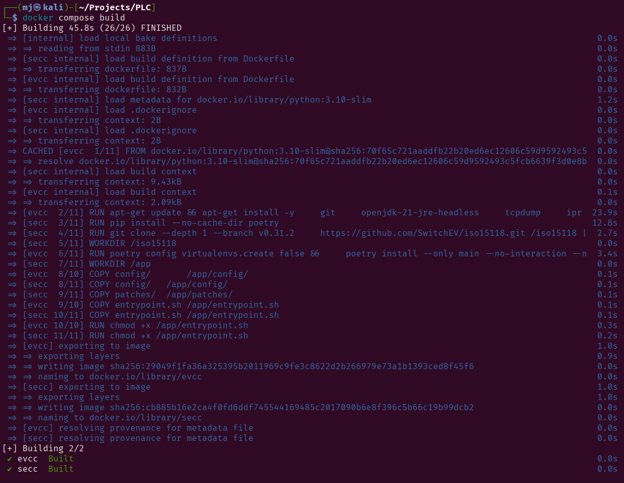
Run the baseline (normal V2G session):
docker compose up
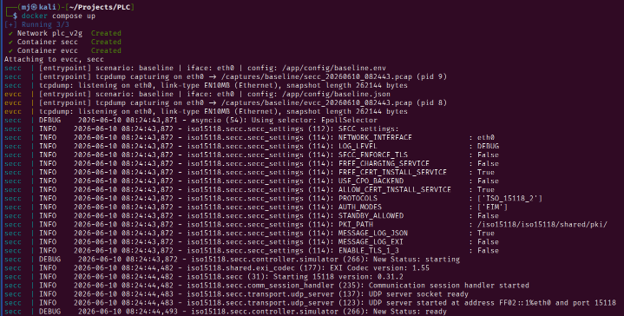
Run a specific attack scenario by setting SECC_SCENARIO to the scenario name (see the SECC Scenarios table above):
SECC_SCENARIO=attack2_no_tls docker compose up
Run with the attacker container (attacks that require active packet injection — SDP spoofing, ICMPv6 MitM, replay):
SECC_SCENARIO=baseline docker compose --profile attack up
Captures are written to ./captures/<scenario>/ as the session runs and are ready for Wireshark analysis immediately after the containers exit.